

This article is a written account of a video from the Lens Of James YouTube channel. Watch the video above and subscribe if you like what you see!
This article contains affiliate links to relevant products I have used in my videos. By buying through these links, I receive a small percentage of the sale at no cost to you which helps me support and grow my website and YouTube channel, so I can create more content like this in the future. Thank you for your support.
If you’ve got an older car without a fancy touchscreen, Apple CarPlay or Android Auto, there’s an easy and affordable way to bring your vehicle’s tech up to date without breaking the bank or buying a new car. Today, we’re diving into a comparison of two impressive dashboard consoles from Carpuride: the W103 Pro and the W903. Both of these devices can transform your dashboard and improve your driving experience by adding fantastic tech to your vehicle, but they each have unique features that set them apart. Whether you’re after the best multimedia experience or looking for a screen with a built-in dash cam, this guide will help you decide.


Unboxing and Design
When you open up the box of the Carpuride W103 Pro, you’re immediately greeted by its impressive 10.3-inch screen, which, including the bezel around the edge, comes to 11 and 3/4 inches in total. It’s a full HD 1080p display and, despite its size, the design is narrow enough that it won’t take up too much space on your dashboard or block your windscreen view. The W103 Pro comes with two mounting options: a suction cup with an extendable arm and a sticky pad mount for a more permanent fixture. The suction cup mount gives you flexibility; it can be attached to your windshield or dashboard, and the arm is extendable for easy adjustment. If you prefer something a little more discreet, the sticky pad is your go-to for a cleaner, more integrated look.
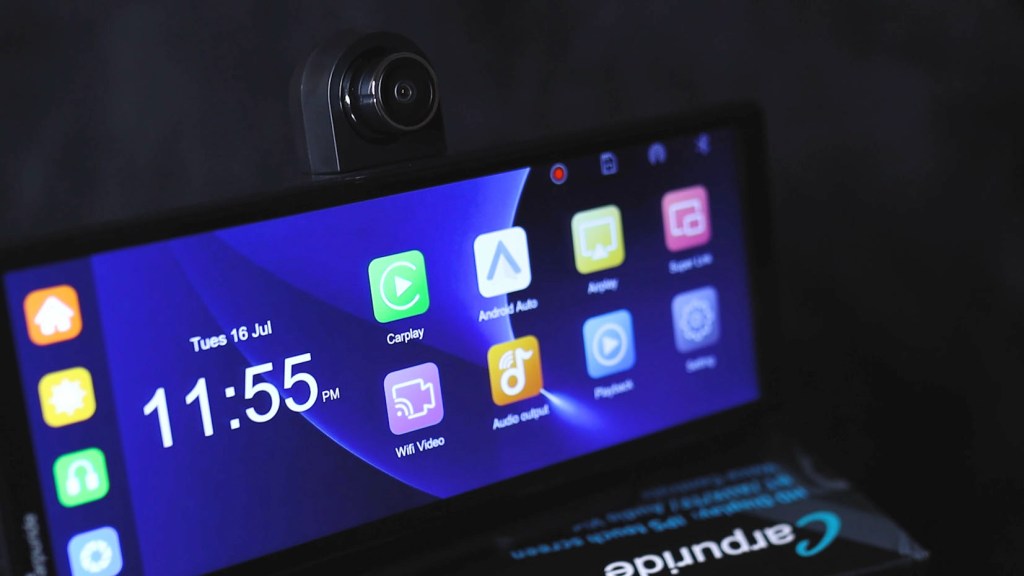
Moving on to the W903, the first thing you’ll notice is its 9.3-inch screen, which is 10.2 inches including the bezels. While the screen is slightly smaller than the W103 Pro, it has a slimmer bezel around the display, giving it a more modern edge-to-edge look. On the W903, the Carpuride logo has been moved to the side, keeping the front view uncluttered. Perhaps the most prominent difference, however, is the adjustable camera on the back of the device. It can be pushed up for a better view of the road from your dashboard, and the lens can also be rotated around nearly 360°, which is super handy for getting it pointed wherever you need it, whether that’s at the road or into the cabin.
Click to buy your own…


(Affiliate links which help support this blog)
Both devices include a suction cup mount and a sticky pad mount, but the W903‘s sticky pad mount has been upgraded with a flexible base, making it perfect for vehicles with curved dashboards. Additionally, accessories included in both boxes are well matched. For the 103 Pro, you’ve got an AUX cable for wired playback, a 12v to USB-C adapter for power, an info sheet, a plate for the suction cup mount, and a manual to get set up. Included with the W903 is an AUX cable, a 12v to USB-C power cable (which also has a USB-A port on the end), a mounting plate, and a manual too. I also got a reversing camera with the W903. The W103 Pro is compatible with reversing cameras too, though I’ll cover that later.


Display Quality
Now let’s talk about the display quality. The W103 Pro offers a 1080p full HD touchscreen, which means your maps, music apps, and any media content will look crystal clear and vibrant. The colours are vivid, and the text is sharp, perfect for quickly glancing at directions and easily seeing what you need while on the road. The 10.3-inch screen makes interacting with the interface easy, whether you’re adjusting the volume, brightness, or switching between apps. It also includes a light sensor on the back that automatically adjusts the brightness based on your environment, so it’s never too bright at night or too dim during the day.
On the other hand, the Carpuride 903 has a 9.3-inch display, but don’t let the slightly smaller size fool you; it’s just as impressive. I found it to be even brighter and sharper, among the best I’ve seen in dashboard consoles across various brands. The display on the W903 feels cleaner and less cluttered thanks to its thinner bezel. It’s also extremely responsive, making navigating through apps or adjusting settings a breeze. Plus, the W903 also features auto brightness controlled by a sensor on the front, ensuring you always have optimal visibility no matter the lighting conditions. While the W903 is probably slightly better quality, there’s not much in it at all, though it does have a slightly cooler, bluer tint to it. For those who want maximum screen real estate, however, the larger W103 is probably the way to go.

Connectivity and Ports
When it comes to connectivity, the W103 Pro gives you plenty of options. Starting on the left, you’ve got a 3.5mm mic port so you can add an external mic for clearer calls, a Micro SD card slot for loading your own music files, a 2.5mm reversing camera port, a 3.5mm audio out AUX port, a USB-A port for playing files from a USB device, and a DC-5v port (also known as a USB-C port) which will power the device using the cable provided. The Carpuride 103 supports both Apple CarPlay and Android Auto, allowing you to easily mirror your smartphone’s interface on the screen. This includes your preferred music player and navigation apps, while notifications appear on screen too with the ability for fast replies and voice commands to keep your hands on the wheel.
Click to buy your own…
(Affiliate links which help support this blog)
In contrast, the W903 strips things down to the essentials with just four ports: a 3.5mm AUX port, a Micro SD card slot (which comes with a 64GB card pre-installed), the 2.5mm reversing camera port, and a USB-C port for power. The W903 clearly focuses on simplicity by including only the most necessary ports, which might appeal to users who don’t need such a variety of connections. Like the W103 Pro, the W903 supports Apple CarPlay and Android Auto too, with the same functionality. However, for both devices, there are ways of mirroring your phone onto the screen. It’s easiest for iPhones and utilises AirPlay, though for Android phones, you’ll need to download separate apps, which makes the process a bit less streamlined.
We’re also on Instagram!
Check out yogi.the.van to keep up-to-date with all our adventures in the van!


Multimedia and Audio
It’s clear that the primary function of both of these devices is multimedia, particularly with the inclusion of CarPlay and Android Auto, which is what most people, including myself, will use most of the time. When listening to music, the W103 Pro offers four options through its built-in 5w speaker: using an AUX cable to connect to your car’s audio system, via FM transmission through your car’s radio, or using Bluetooth to play audio wirelessly through your vehicle speakers. You can stream the music via your phone or play files directly from a USB stick or micro SD card, making it easy to access your favourite music, photos, or videos.
The W903 takes a similar approach but adds a few extras. It offers CarPlay and Android Auto, along with the built-in speaker, AUX, radio, and Bluetooth playback for audio. However, with the inclusion of a built-in 4K dash cam, the W903 also includes a Wi-Fi video feature using the Viidure app, which lets you live stream footage from the dash cam to your phone or view recorded clips remotely. This gives the added bonus of enhanced vehicle security, which will no doubt be an important factor for some. On the W903, when connected and listening to audio via Bluetooth, steering wheel controls will work; however, they won’t with the W103 Pro. To set this up on the W903 is easy. The trick is connecting your phone to the device via CarPlay or Android Auto, and then connecting your phone to your car’s Bluetooth. By doing this, your phone tells the vehicle to play sound while telling the dashboard device what to display. It’s very clever and a fantastic integration of third-party tech into a vehicle.


Cameras and Video Quality
Now here’s where the W903 pulls ahead a bit: it’s built-in 4K dash cam. This isn’t just a bonus add-on feature; it’s a full-fledged rotatable dash cam that can turn almost 360°. This makes it easy to capture both the road ahead or, if needed, the interior of your vehicle without needing another device taking up space on your windscreen and power from your battery. The dash cam starts recording as soon as the W903 powers on, so you don’t need to worry about turning it on manually every time. The W903 also supports an optional 1080p reversing camera that can double as a rear dash cam, so you’re recording footage from both ends of the car. As mentioned earlier, you’ll need to attach the red wire to your reversing light wire to trigger the camera to come up on your screen when you put the car in reverse. It’s a bit of extra work, but it’s absolutely doable, and I’ve made a complete step-by-step video guide if you’re interested in giving it a go yourself.
Click to buy your own…
(Affiliate links which help support this blog)
With or without a reversing camera installed, you can view dash cam footage in real time or access it later from the device or remotely through the playback app mentioned earlier. This feature is incredibly useful for parking, safety, and as proof for insurance claims. The W103 Pro, while a great device, doesn’t come with a built-in dash cam; however, it does support the addition of a reversing camera, which connects through the 2.5mm port on the back of the device. It’s a solid option for those who want a reversing camera but don’t need full dash cam functionality. When reversing, both of these devices bring up reversing lines that are adjustable in the settings to help with parking accurately.
Performance and Usability
When it comes to everyday use, both models offer quick startup times and a smooth practical interface. Both are easy to get going with Android Auto or Apple CarPlay, and after the first setup, they’ll automatically connect when you start your vehicle.


The W103 goes from powering up to the home screen in 10 seconds and reaches the Android Auto screen from startup in 29 seconds. While the W903 is slightly faster at 7 seconds and 22 seconds for reaching the home screen and Android Auto screen from startup respectively. On both devices, the home screen layouts are user-friendly, featuring large icons and quick responsive buttons and controls. You also have access to voice control via Siri or Google Assistant, allowing you to use hands-free commands for navigation, calls, and music. Both systems are stable and easy to navigate. Switching between apps is quick with little to no lag, and the overall layout is designed to be uncluttered while being simple and, most importantly, safe to use while driving.
Pricing and Conclusion
So how much will one of these devices set you back? The W103 Pro can be found for around £200 or $270, including a reversing camera, making it a great investment for those who want that slightly larger screen and a complete multimedia experience in their car. Despite the added extra of a built-in 4K dash cam, the W903 comes in at around the same price. However, if you see one for around £40 less, it’s most probably got the 2.5k dash cam instead of the 4K one, which is a good way to save some money.
Click to buy your own…
(Affiliate links which help support this blog)
Having reviewed a number of dashboard consoles from different brands over the years, there’s no doubt in my mind that these are two of the best out there. The W103 Pro benefits from that slightly larger screen and is a fantastic all-round device for drivers who want the best of seamless media integration and easy navigation without needing to modify the car’s existing head unit. The Carpuride W903, with its built-in 4K dash cam and dual-camera support, coupled with the screen quality and stripped-down features, make it a no-brainer for anyone looking to add both safety and tech upgrades to their vehicle in one go.
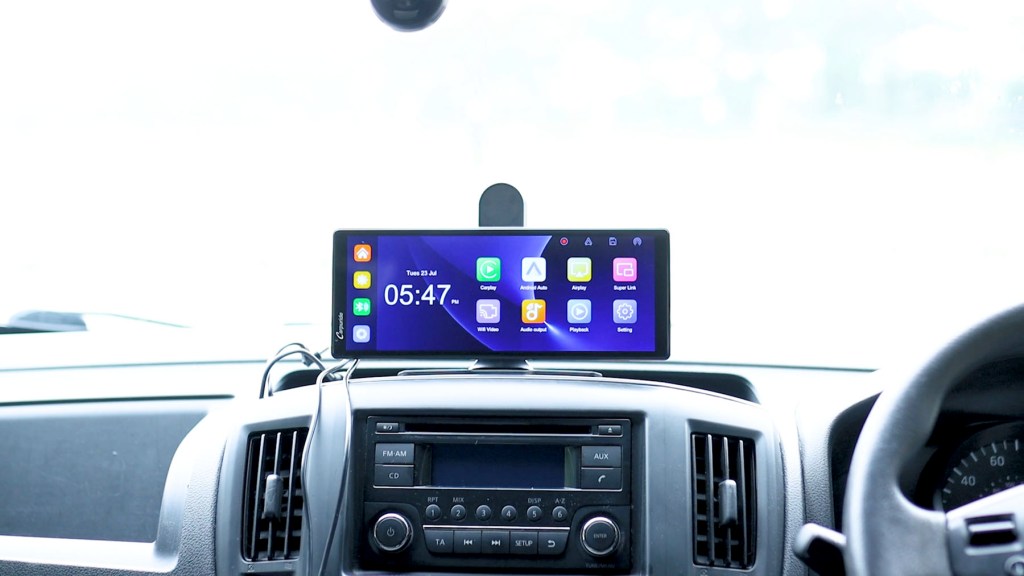

After using both extensively, I’ve settled on the W903. For me, I like that it’s just a little sleeker with a slightly higher quality screen. The 4K dash cam’s a great addition too, and I’ve had no problems with it. It just sits there on the dash doing its job, and the firmware has proved super stable. If you have any questions, be sure to drop them below, and I’ll do my very best to answer them. Thanks for reading and happy driving!
Click to buy your own…
(Affiliate links which help support this blog)
 The Tiny Camper Van